

Description
Fasta Vape Screen Meaning: Complete Display Guide 2026
Confused by Fasta Vape screen meaning? This complete Fasta Vape screen guide explains every symbol on the Fasta Burrst 35K display.
Fasta Vape screen symbols show:
- Battery life
- E-liquid levels
- Power modes
- Puff counter
- Safety alerts
Unlike button-only disposables, the Fasta Vape screen provides real-time stats for better control and longer device life.

Fasta Vape Battery Indicator Meaning
The most common Fasta Vape screen meaning relates to battery status:
- Green Bar / 100% – Full charge (vape all day)
- Yellow Bar / 50% – Medium battery (charge soon)
- Red Bar / <20% – Low battery (USB-C recharge now)
- Blinking Red – Critical battery (<5% remaining)
- Flashing 3x – Overtime protection (draw longer than 8 seconds)
Pro Tip: The Fasta Vape screen battery indicator updates live while puffing.
Fasta Vape E-Liquid Level Screen Meaning
Fasta Vape screen meaning
The juice indicator prevents dry hits and burnt coils.
E-Liquid Level Guide:
- 100–75% (Full Bar) – Keep vaping
- 50–25% (Half Bar) – Plan for replacement
- <10% (Red/Empty) – Replace device
- Blinking Indicator – Dry hit risk, stop immediately
On Burrst models, the screen may show dual tank levels (main tank + flavor boost tank).
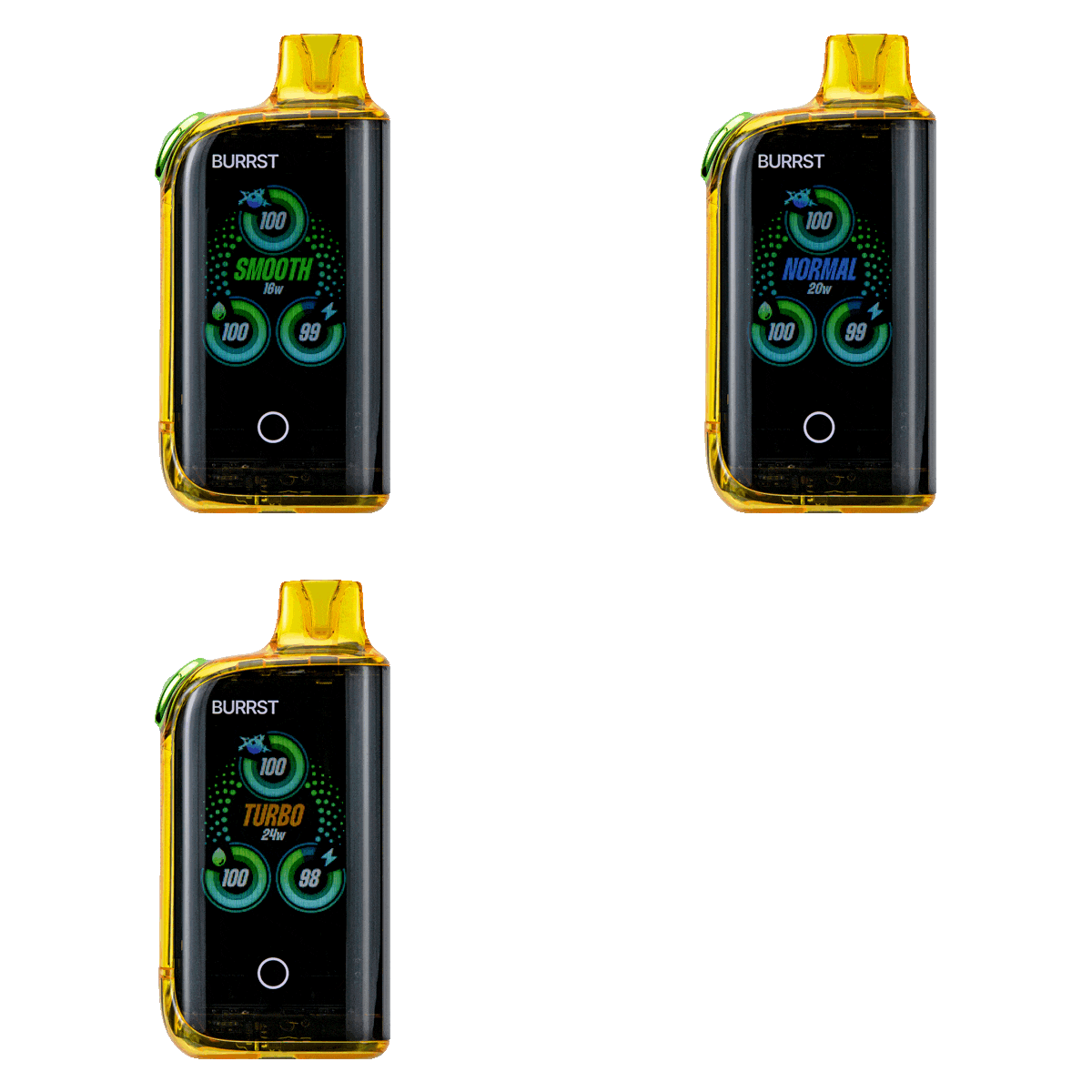
Fasta Vape Power Mode Screen Meaning
Some Fasta Vape screen models offer adjustable power modes (double-tap to switch):
- Smooth / Normal Mode – Balanced flavor for daily use
- Turbo / Boost Mode – Bigger clouds, stronger hit
- Eco Mode – Battery-saving setting
The screen may display:
- “NORM”
- “BOOST”
- Wattage range (typically 15W–25W)
Puff Counter & Other Screen Symbols
Puff Counter:
Tracks total puffs taken.
- Reset: Hold button for 5 seconds (model dependent)
- 35K models typically deliver up to 30,000–35,000 puffs
Lock Icon:
Device is locked (press button 5x to unlock).
Ohms / Resistance (e.g., 1.2Ω):
Indicates coil resistance.
Fasta Vape Screen Error Meanings
OVERTIME – Puff exceeded 8 seconds (shorten draw)
LOW BAT – Battery critically low (recharge)
NO ATOM – Coil issue (replace device)
HOT – Overheat protection activated (rest 10 minutes)
LOCK – Child safety lock engaged
Advanced Features: Fasta Burrst 35K Screen
The Fasta Burrst 35K includes an advanced display that may feature:
- Dual e-liquid percentage indicators
- Flavor boost mode activation
- Adjustable airflow visuals
- Real-time battery percentage
This makes it one of the most user-friendly high-puff disposable vapes available.
Quick Reference Guide
Battery Colors
Green = Vape Freely
Yellow = Charge Soon
Red = Recharge Now
Juice Levels
Full → Half → Low → Empty
FAQs: Fasta Vape Screen Meaning
What does green mean on the Fasta Vape screen?
It indicates a full battery.
What does a blinking red screen mean?
Battery is critically low.
What does 0% e-liquid mean?
The device is empty and should be disposed of responsibly.
Why is my Fasta Vape screen frozen?
Recharge the device and allow it to rest for 5 minutes.
Master Your Fasta Vape Screen
Understanding Fasta Vape screen meaning helps you:
- Avoid dry hits
- Protect battery life
- Maximize puff count
- Use boost modes correctly
Upgrade to a screen-enabled Fasta Vape model for better control and performance.

Reviews
There are no reviews yet.